Is there anything more annoying than spotting a random charge on your bank account? Something like £12.99 — PDF Scanner Pro.
You go from having no idea what it was, to slowly remembering why you needed it, and then landing on that final thought: “Oh right… I was going to delete it straight away.” So what happened?
Auto‑renewals happened. They’re designed to win.
Signing up is easy. Leaving? not so much. Companies don’t remind you when your trial is about to expire, and half the time it’s unclear whether cancelling early means losing access immediately — so most people just stay on. Not because they want to, but because the system nudges them into staying.
I fell for the auto‑renew trap a few times before I changed my approach. And honestly, the resistance was fascinating. Every time I’d think, “this time I’ll remember”, “this time will be different.” But 30 days is a long time. It’s absurd to expect yourself to remember one tiny task on one specific day. That’s not discipline — that’s wishful thinking.
You’re left with two choices: keep trusting your memory (even though it’s failed you before), or set one simple rule that deals with it once and for all.
So what’s the solution?
One rule: You don’t click “start free trial” unless your to‑do app is open and you’re setting a reminder to cancel.
That’s it.
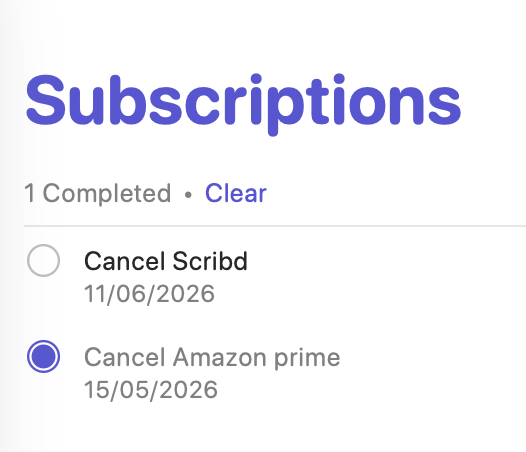
I use Apple Reminders, but any app works. Create a dedicated Subscriptions list, add the renewal date, and let the system remember for you. If you want to play it extra safe, set the reminder a couple of days before the renewal date. If it renews on the 10th, you cancel on the 8th — no rush, no drama.
This tiny habit saved me some money. But mostly it’s saved me from that “oh no” feeling when a charge hits.